


Church Center
4.41.45K Reviews
App Specs
- Version
- 2026.8.24
- Updated On
- License
- Free
- Downloads
- 1,000,000+
- Developer
- Planning Center
- Categories
- Lifestyle
- Platform
- Android, iOS
Screenshots
 Analysis by AppCompare
I’d judge Church Center less as a general social app and more as a shared front door for a particular congregation. That distinction matters: its usefulness depends on whether your church has set it up and whether the parts you need are active there. When the fit is right, it can put schedules, groups, giving, and church media in one place. When it isn’t, you may still need the church website, email, or a direct conversation to get things done.
Start with the church, not the download
Before relying on it, I’d first check that your congregation uses Church Center and that you have found the correct church in the app. The app is free, is rated for Everyone, and is made by Planning Center. Its Lifestyle classification makes sense: the focus is coordinating participation and keeping up with a community, rather than replacing a phone’s general calendar or messaging tools.
This church-first setup is both its strength and its main qualification. A general calendar can hold every appointment in your life, but it won’t necessarily tell you what is happening in your congregation. Church Center can make church information easier to reach, yet it is not automatically a universal directory for every church. If your congregation does not use it, or only uses a small portion of it, the app will have less to offer you.
A practical path from checking plans to showing up
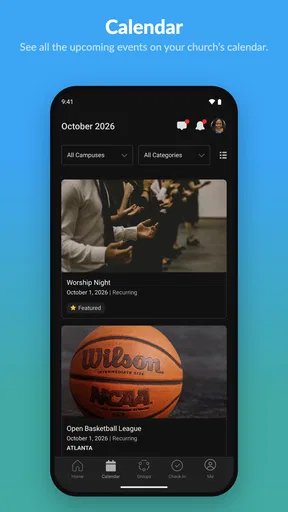
For a normal week, I’d begin by opening the church’s information and looking at the events calendar before making plans. That gives me a chance to catch a gathering I might otherwise overlook and decide whether it fits the rest of the week. The useful habit is to check the church calendar at the same time I review my personal schedule, rather than expecting the app to replace it. I would still put important commitments into the calendar I use every day.
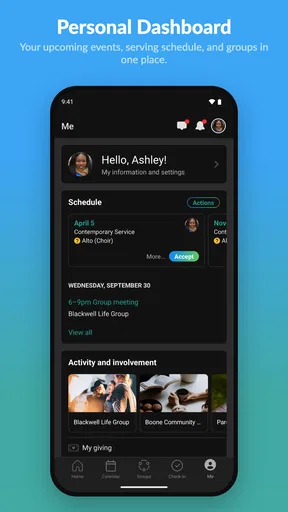
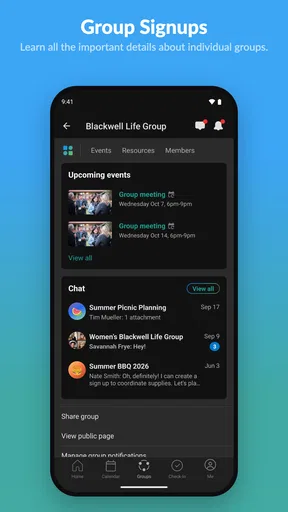
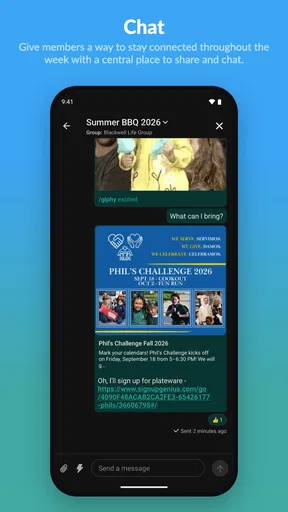
From there, the flow can move from browsing to taking part: look at a group, find out who is connected to it, and use the group conversation to coordinate. That is a more specific job than a broad social network does well. A general messaging app may be familiar, but church-related plans can become scattered across chats, email, and announcements. Having group activity in the same church setting can reduce that fragmentation when the congregation and its members actually use it.
Where the handoffs help—and where they do not
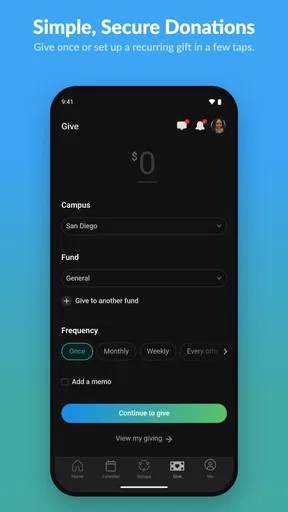
Giving is another step in that workflow. I can see why having a giving section nearby is convenient, especially when I want to make a contribution without needing to remember cash or find a separate route. Being able to review giving history can also help someone keep track of their own activity. I’d still treat it as a personal record and take a moment to check the details before confirming a transaction; convenience should not mean tapping through without attention.
The handoff from the app to real people is more important than any tidy interface. A group listing is useful when it leads to a conversation, and a calendar entry matters when it helps someone actually attend. In practice, the app works best as a bridge between church information and participation—not as a substitute for the relationships, announcements, and follow-through that happen offline.
Worth Reading Before You Choose

EA SPORTS FC Mobile 26 Is a Bigger Football Game, but It Takes Time

Flipboard Shows What News Apps Must Do Beyond the Feed

Switching to Android Auto Means Rethinking Your Driving Routine

Google Calendar Makes a Crowded Week Easier to Manage

Ludo King Makes the Most of the Minutes Between Plans

Baby Panda World Brings Quick Play to Modern Phones, but Its Game Library Feels Busy
Who will get the most out of it
I’d recommend it most to someone whose church actively maintains its Church Center presence, especially if that person wants one familiar place to check events, groups, giving, or sermons. It may be particularly helpful for a newcomer trying to understand what is available, or for a busy member who wants to check church plans between work, family responsibilities, and the rest of the week.
For someone who attends occasionally, the benefit may be simpler: checking the calendar before deciding whether to go, or catching up with a past sermon after missing a service. But if you only want a general calendar, a standalone calendar app is probably a better fit. If your church shares everything through its website or a messaging service and you are happy with that arrangement, installing another app may not improve your routine.
The app has a 4.4 average from around 4,500 ratings, and it has passed one million installs. Those figures suggest it has reached many people, but they do not tell me whether a particular church keeps its own information current. That local experience is what I would use to decide whether the app will be worth keeping on my phone.
Its current version is 2026.5.27, and it requires Android 10 or later. If you are choosing between a phone app and the church’s usual website, I’d use the app for repeated, quick checks and the website when I need to browse more broadly or find information that the congregation has not brought into the app. They serve different habits; one does not automatically make the other unnecessary.
One practical tip is to treat the app as a starting point rather than an unquestionable source of every detail. If a date or group plan affects other people, confirm it in the relevant conversation before arranging your day around it. The app can make information easier to find, but coordination still depends on people keeping it current and responding to one another.
Church Center has been released since November 26, 2018, and its appeal is easy to understand: it brings several church-related tasks into a familiar mobile setting. I would not choose it for decorative flair or as a replacement for every tool I use. I would keep it if my church’s calendar, groups, and other useful sections were active enough to make checking them feel natural.
Hey there! So, I recently got my hands on the Church Center App, and let me tell you, it’s been quite a ride. If you’re like me and always looking for ways to stay connected with your church community, this might just be what you need. Let’s dive into the nitty-gritty of what makes this app tick.
First Impressions
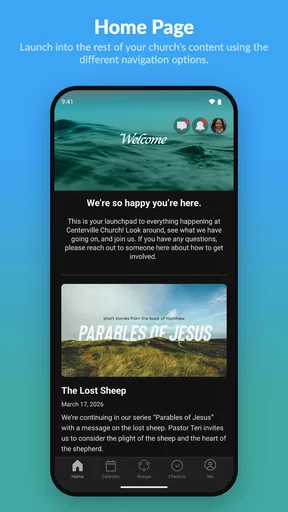
Right off the bat, the Church Center App presents itself with a clean and intuitive interface. You know how some apps just feel cluttered and you can't find anything? Well, this isn’t one of them. Navigating through the different sections is a breeze, thanks to its user-friendly design. Everything is laid out in a way that just makes sense.
Features Galore
Now, let’s talk features. The app is packed with everything you need to stay in the loop with your church activities. From checking out upcoming events to joining groups, it’s all there. I especially loved the calendar feature. It's like having your church's schedule in your pocket. No more missing out on those potluck dinners!
Another cool thing is the giving section. If you’ve ever forgotten your wallet at home, you’ll appreciate how easy it is to give directly through the app. Plus, you can track your giving history, which is pretty neat.
Engagement and Community
One of the things that stood out to me was how the app fosters community engagement. You can join small groups, see who’s in your group, and even chat with them. It’s like having a mini social network just for your church. If you’re someone who loves being involved, this feature is a game changer.
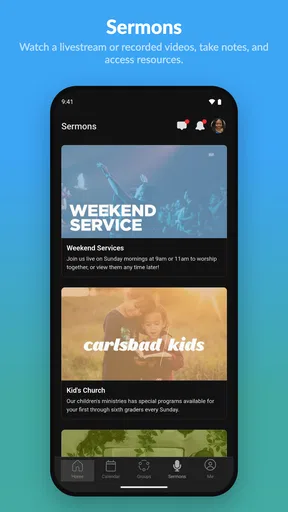
I also noticed a section for sermons. You can listen to past sermons whenever you want, which is perfect for those days when you need a little extra inspiration. Or maybe you just missed the service because, well, life happens!
Setup and Customization
Setting up the app was a breeze. Once you download it, all you need to do is find your church and you’re good to go. The customization options aren’t extensive, but honestly, I didn’t feel like they needed to be. The app does a good job of giving you what you need without overwhelming you with too many choices.
For those of you who love to tinker, there are some settings you can adjust to make the app feel a bit more personal. But overall, it’s ready to use straight out of the box.
Room for Improvement?
No app is perfect, right? While the Church Center App does a lot of things right, there are always areas where it could improve. Personally, I think adding a feature for prayer requests could be a nice touch. Imagine being able to send out a quick prayer request to your group? That’d be pretty awesome.
Also, while the app is super functional, a little more flair in the design wouldn’t hurt. But hey, that’s just me being picky!
All in all, the Church Center App is a solid choice for anyone looking to stay connected with their church community. It’s functional, easy to use, and has features that cater to most of your church-going needs. Whether you’re tech-savvy or a bit of a technophobe, this app has got you covered. Give it a try and see how it helps you stay connected with your faith community. You might just find it’s the app you never knew you needed!
Pros
- User-friendly interface for easy navigation.
- Seamless integration with church events.
- Customizable notification settings.
- Quick access to group resources.
- Secure handling of personal data.
Cons
- Limited offline functionality.
- Requires regular updates for features.
- Some features need admin access.
- Occasional sync issues with calendar.
- Limited customization for themes.
FAQs for Church Center
What is the Church Center App and what features does it offer?
The Church Center App is a versatile tool for church communities, providing features like event registration, group management, donation tracking, and more. It allows users to connect with their church, view service times, and participate in church activities seamlessly. The app is designed to enhance community engagement and streamline church operations.
Is the Church Center App available for both Android and iOS devices?
Yes, the Church Center App is available for download on both Android and iOS platforms. Users can easily find it on the Google Play Store and the Apple App Store, ensuring accessibility for a wide range of smartphone users to stay connected with their church community.
How secure is the Church Center App for handling personal information?
The Church Center App prioritizes user security by implementing robust encryption and privacy measures. Data protection is a key focus, ensuring that personal information, payment details, and other sensitive data are kept secure. Users can trust the app to handle their information responsibly.
Does the Church Center App offer support for multiple churches or campuses?
Yes, the Church Center App supports multiple churches or campuses, making it ideal for users who attend services at different locations. Through its intuitive interface, users can easily switch between different churches, access specific information, and stay updated on events and announcements.
Are there any costs associated with using the Church Center App?
The Church Center App is generally free to download and use. However, some features may require church-specific subscriptions or donations. It's advisable to check with your church for any associated costs or contributions needed to access certain functionalities within the app.


